
B612

Description
About B612 APK
B612 is a versatile photography app designed to help users capture stunning, humorous, and beautiful photos using an array of creative stickers. The app is freely available on various platforms and devices.
Convenient Features in B612 APK
B612 offers an array of user-friendly features that make photo-taking a joyous experience.
-
The app features an extensive library of over 1,500 funny and lovely stickers. What’s more, it comes equipped with automatic face recognition technology. When you select a sticker, B612 seamlessly transforms your face to match the image, adding a personal touch to each photo.
-
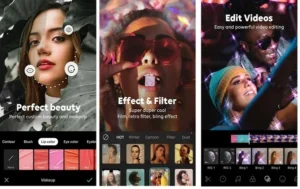
B612 boasts an advanced beauty camera that adjusts your facial features to perfection with just one touch. The app is packed with powerful photo editing tools, allowing you to smooth out your skin, enhance your eyes, and refine your nose. These enhancements transform your selfies into breathtaking portraits.
-
The app offers a wide range of ultra-standard filters, ensuring your images are vibrant and full of color. Simply choose a filter that suits your style, and B612 will instantly enhance your photos, making them more visually appealing.
-
You can create your own music videos within the app, complete with background music tailored to each content style. This feature allows you to showcase your creativity and share memorable moments with friends and family.
-
The boomerang movie recording feature is another exciting aspect of B612. This function captures repetitive videos with cool image processing, ensuring that your clips are both entertaining and visually appealing. Whether you’re aiming for humor or style, this feature provides endless possibilities for creative expression.
-
B612’s sticker AR technology combines the real and virtual worlds seamlessly, enabling you to take dynamic photos filled with life. This unique feature integrates images in a seamless manner, making your photos stand out in a crowd.
Steps to Create Your Own Style Music Video with B612 APK
To create a compelling music video using B612, follow these steps:
Step 1: Open the B612 application on your phone to get started.
Step 2: At the main interface of the application, select the music option to begin your video creation process.
Step 3: The screen will prompt you about the music video creation feature. Click on the “Select Music” section to proceed.
Step 4: Choose music that aligns with your topic, such as “HOT,” “FUNNY,” or “CUTE.” Listen to the melody and confirm your selection.
Step 5: The B612 software will switch to the video recording interface, where you can begin capturing your music video. You can pause recording to switch scenes using the pause button.
Step 6: Once you’ve finished recording, select the V-shaped icon to save your video. Enjoy your creation and share it with friends and family.
B612 is more than just a photo editing app; it’s a versatile tool designed to help you capture life’s moments beautifully. With its array of features, including selfie video recording, boomerang clips, and AR technology, B612 stands out as an ideal application for creating artistic photos and engaging videos. Whether you’re aiming to capture perfection or express your creativity, Camera B612 has everything you need to take your photography to the next level.
Images


Related apps





Developer's apps
Best Rated Apps
Latest Apps


